
Guide Manual
Guide Book Style Guide
The following points give tips on how to write consistent text and route descriptions.
- Grammar: Please use correct English grammar and punctuation in climb descriptions, including correct use of capitals and proper sentences. Avoid txt style abbreviations. Remember it will be published in a book.
- Keep sentences short and punchy. Hemingway style. If in doubt, break sentences with multiple clauses into their own sentences.
- Capitalisation: Headings and climb names should be capitalised in Title Case.
- Punctuation: always place a space after fullstop, comma, colon or semi-colon, but never before. An ellipsis has 3 dots only. There should be a space both before and after a dash.
- Spacing: only ever a single space. No blank lines.
- No space between the number and "m" or "km" where it's a length eg "123m" not "123 m"
- Try to keep line breaks to a minimum, as they chew up space. But line breaks in a multi pitch climb are OK, they make it much more readable.
- For multipitch, the format is:
1. 30m 18. Blah.
2. 25m 26. Blah blah.- Note - no brackets at all, use a dot after the pitch number and a dot after the grade.
- Put each pitch on a new line.
- For climbs, include the first ascent in the FA box. For boulders, no FA is recorded.
- No "FA" text is needed, just the name and date of the first ascensionist. FFA is ok in that case. Full names are preferred if available, otherwise like "J. Nermut" with a space after the full stop.
- Dates: Standard format is the 3 letter abbreviated month (with no full stop) with the full year. e.g. Jun 1974 or Dec 2007. Full stop at the end of the FA info.
- Abbreviations: Abbreviations for L and R are ok but not mandatory. BR, FH & DBB are also ok.
- Arête has a circumflex on the e.
- Guides should read left to right, with very few exceptions. However, keep in mind the direction the reader will be walking along the cliff line.
- Break climbs into sections based on buttresses or crags wherever possible. Use a heading2 or heading3 style text block to start the section.
Here is an example climb in the correct style:
Stud City 100m 19
The original classic on this part of the cliff, it is highly regarded. Well protected, it takes in the enormous flake that can be seen from just before the horizontal chimney on the sea level traverse. It is much easier to approach along the higher traverse line, the route along the base of these climbs, than from sea level. The climb begins straight above the horizontal chimney by the largest gum tree on the scrubby terrace.
1. 30m 18. Up right trending crack until the large hollow flake is reached. Traverse right, along the flake and up groove to belay on ledges.
2. 40m 19. Continue up to the flake, undercling right along the flake to its end. Move 3m right across slab to belay below water runnel chimney.
3. 30m 19. Move up chimney groove to finger crack, continue up until the climbing gets desperate, at which point it is possible to move left onto the wall, which is climbed to a small ledge and crack. Take the handcrack to top (keep the rope on for the tree-filled corner above).
B. Kennedy, T. Beaman, R. Muehlin, Jan 1977. FFA: H, Rock Daddy, Noel Baby.
Climb topo style guide
New topos should be drawn with the topo tools described above, on a clean, unannotated photo.
How to Edit a Guide
- Sign in (the account menu at the top right). On a guide page you will see Edit this Guide in the header; press it and the guide goes into edit mode. The ▾ beside it has more actions, such as History and Add a page here.
- In edit mode every part of the guide is a block: the header, climbs, text, photos and topos, and GPS. Press Edit on a block to change it, and press it again to close it.
- Edits save straight away, block by block, and the bar at the top says when everything is saved. There is no Save button. Use Undo and Redo if you change your mind, and Preview to see the guide as readers will.
- The editor looks like this:
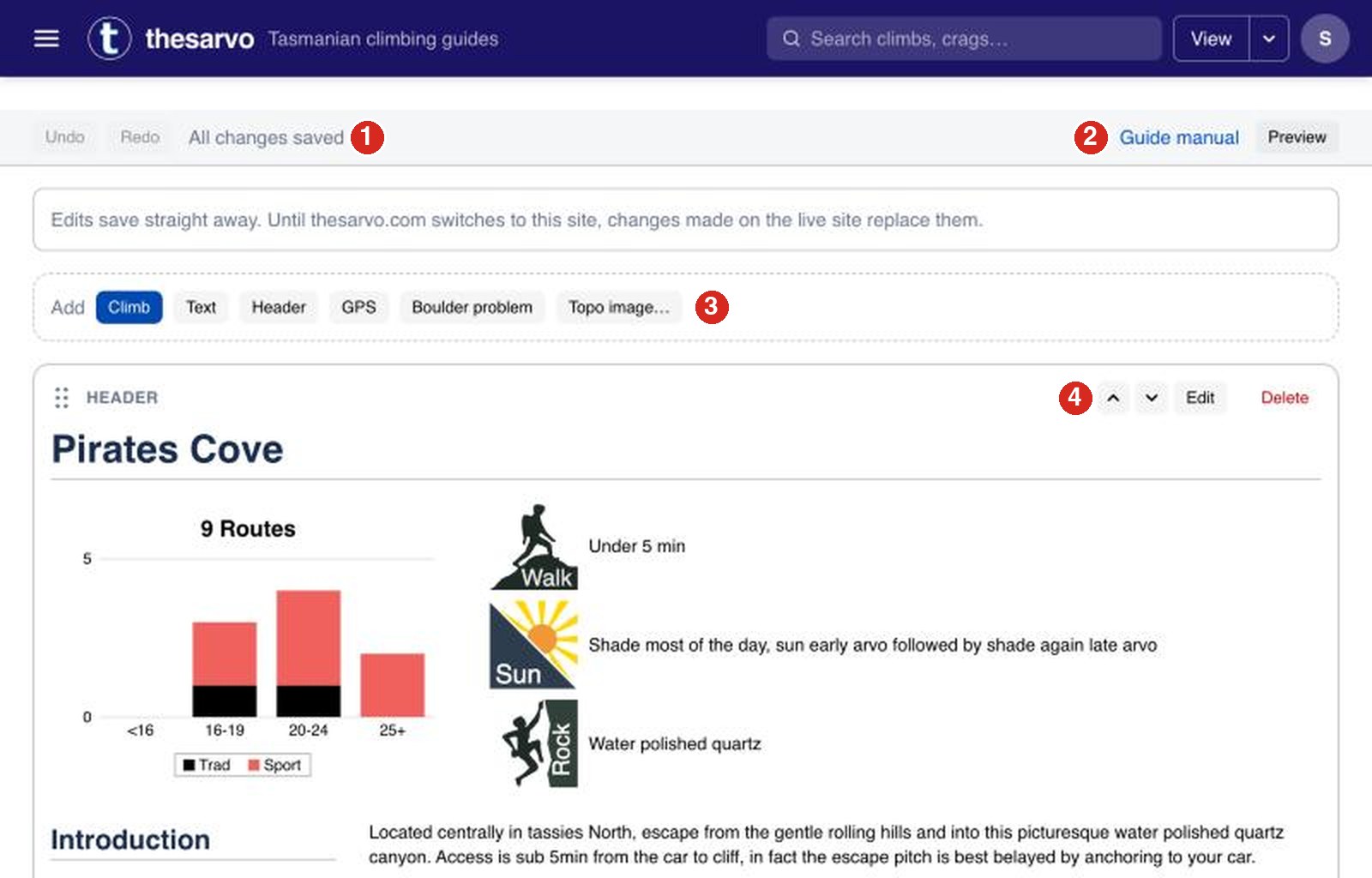
- Undo, Redo and the save status. "All changes saved" means nothing is waiting.
- Guide manual opens this page in a new tab; Preview shows the guide as readers see it.
- The insert bar: Climb, Text, Header, GPS, Boulder problem or Topo image. Click + Insert between any two blocks to add one there.
- Every block has a handle to drag it, up and down arrows, Edit to change it and Delete to remove it.
- If someone else changes the same block while you are editing it, you are asked which version to keep.
- To add something, use the insert bar between blocks: choose Climb, Boulder problem, Text, Header or GPS. For a heading, add a Text block and set its style to a heading. Fill in the fields as you go.
- If the route is a sport route, put the "Þ" symbol in the Extra field. It will then count as a sport climb in the crag summary chart.
- To move a block, drag its handle on the left, or use the up and down arrows. To remove it, use Delete on the block.
- To add a photo, insert a photo block and choose or upload an image. You can crop and rotate it, and adjust brightness, contrast and saturation, before it is used. Photos from a phone are fine; they are resized for you. For photos that will be printed in a book we need at least 500 pixels wide, and up to 1800 pixels.
- Climbs have their own fields:
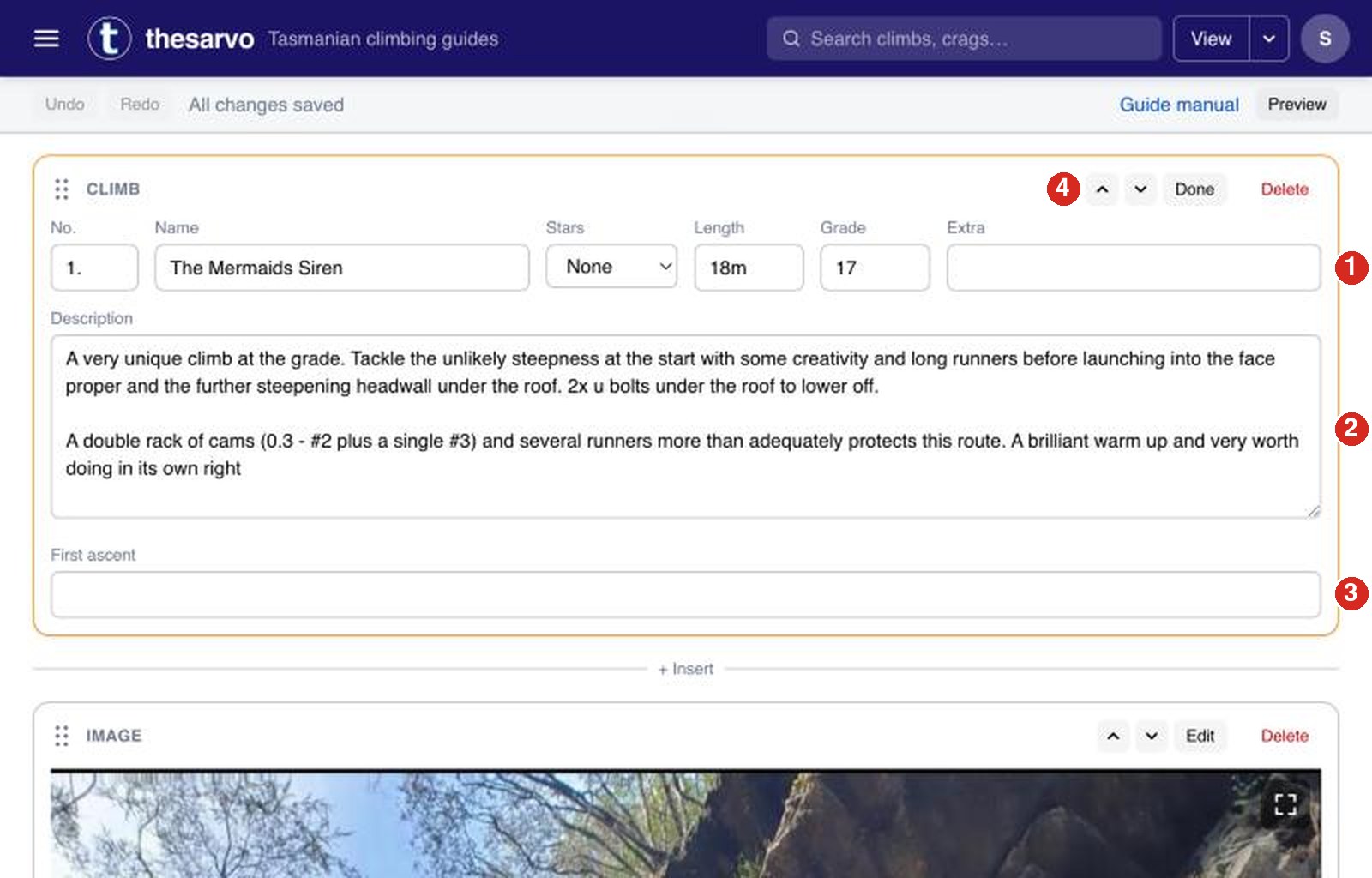
- Number, name, stars, length, grade and the Extra field (put "Þ" there for a sport route).
- The description. Keep it to the points in the style guide above.
- The first ascent, as "Name Name, 1984".
- Press Done to close the block. Nothing else to save: it is already stored.
- To draw a topo on a photo, open the photo block and use the topo tools: Draw route to trace a route (press Enter to finish it), Add label for text boxes, and Select to move things. In the Legend link each route to a climb so readers can click between them. Press ? in the topo editor to see the keyboard shortcuts.
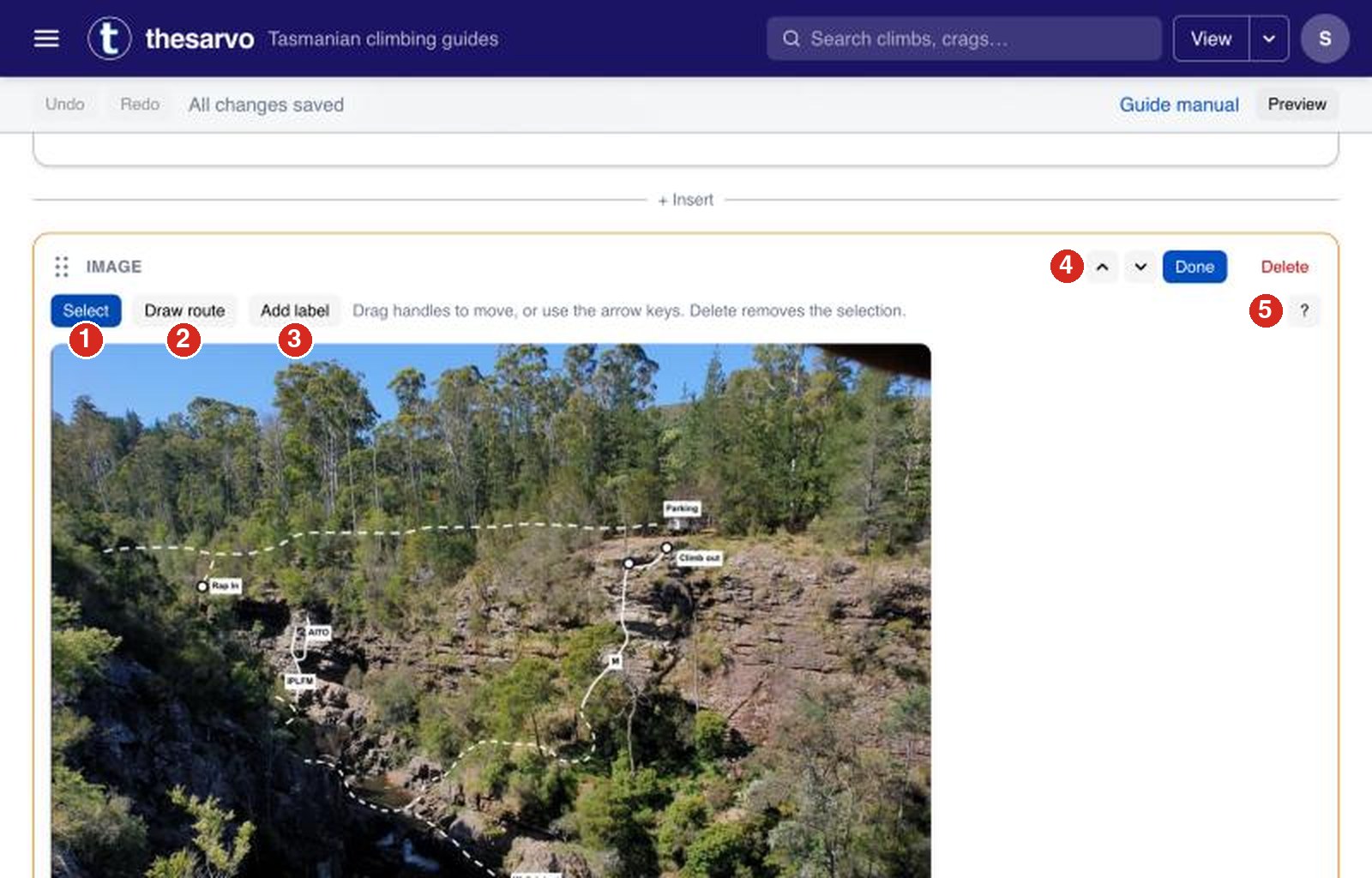
- Select: click a route or label, then drag its handles to move it. Delete removes the selection.
- Draw route: click along the line of the climb, and press Enter to finish.
- Add label: a text box on the photo, such as a climb name or "Rap in".
- Done leaves the topo tools.
- ? lists the keyboard shortcuts.
- To start a whole new guide, use Add a page here in the page menu, or email Jon.
Don't worry if you don't get it perfect: every change is kept in the page's History, and there are plenty of people who will fix things up.